
What TikTok's Pixel Knows About Your Cancer, Fertility, and Mental Health Crisis
The technical evidence behind the BBC's investigation into TikTok's expanded web tracking.
Last week, BBC Future published an investigation into TikTok's tracking pixel — the invisible code that follows you across the web, even if you've never used TikTok. Our team at Disconnect provided the technical analysis for that story. We found that TikTok recently and quietly expanded its pixel to collect significantly more data, using techniques that go beyond what we've seen from comparable tracking tools.
This post presents that evidence. Everything below can be confirmed with a browser, Chrome DevTools, and TikTok's own publicly available scripts.
All screenshots and analysis were conducted in early February 2026, prior to the BBC article's publication. Since then, the websites identified may have altered or removed the TikTok pixel.
What Changed
In December 2025, TikTok shipped a major update to its tracking pixel. The script grew by roughly 30%, and introduced new data collection mechanisms. We compared the November and December versions and found code patterns that did not exist before:
| Pattern | Nov 2025 | Dec 2025 |
|---|---|---|
CDP_VISITER_PLUGIN | Not present | ✓ Present |
TEXT_TREE_WALKER_PLUGIN | Not present | ✓ Present |
dataLayer references | 0 | 15+ |
aam_data_layer | Not present | ✓ Present |
Both script versions are still accessible for verification:
- Nov 2025:
https://analytics.tiktok.com/i18n/pixel/static/main.MTc3NWUxZTAxMQ.js - Dec 2025:
https://analytics.tiktok.com/i18n/pixel/static/main.MTc2YTgwMDRlMQ.js
What We Found on Real Websites
We observed TikTok's updated pixel actively collecting data on websites that handle deeply sensitive information. In every case, the pixel had Auto Advanced Matching enabled — automatically collecting emails from form fields and other sources on the page.
TikTok's own documentation recommends that sites in "regulated or sensitive industry such as financial services or healthcare" should use Manual Advanced Matching instead. Every health-related site below was using Auto.
Crisis Text Line (crisistextline.org)
Crisis Text Line provides free crisis intervention via text message for people dealing with stress, anxiety, self-harm, and suicidal thoughts.
When we clicked "Reach A Crisis Counselor," TikTok's pixel fired a Click event containing the button text and the user's hashed email:
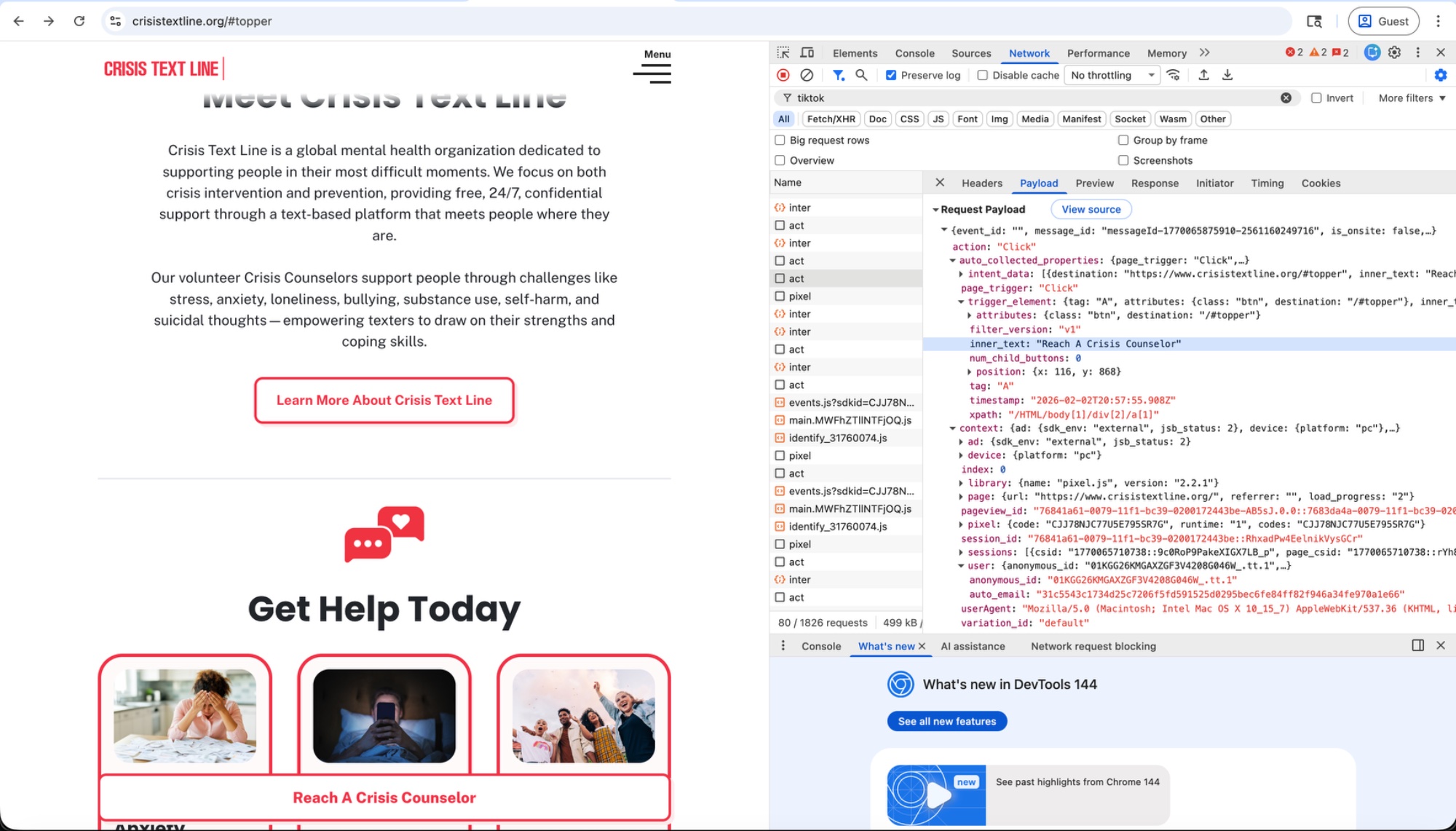
The payload's trigger_source showed aam_data_layer — the email was intercepted from Google Tag Manager, not provided by Crisis Text Line directly.
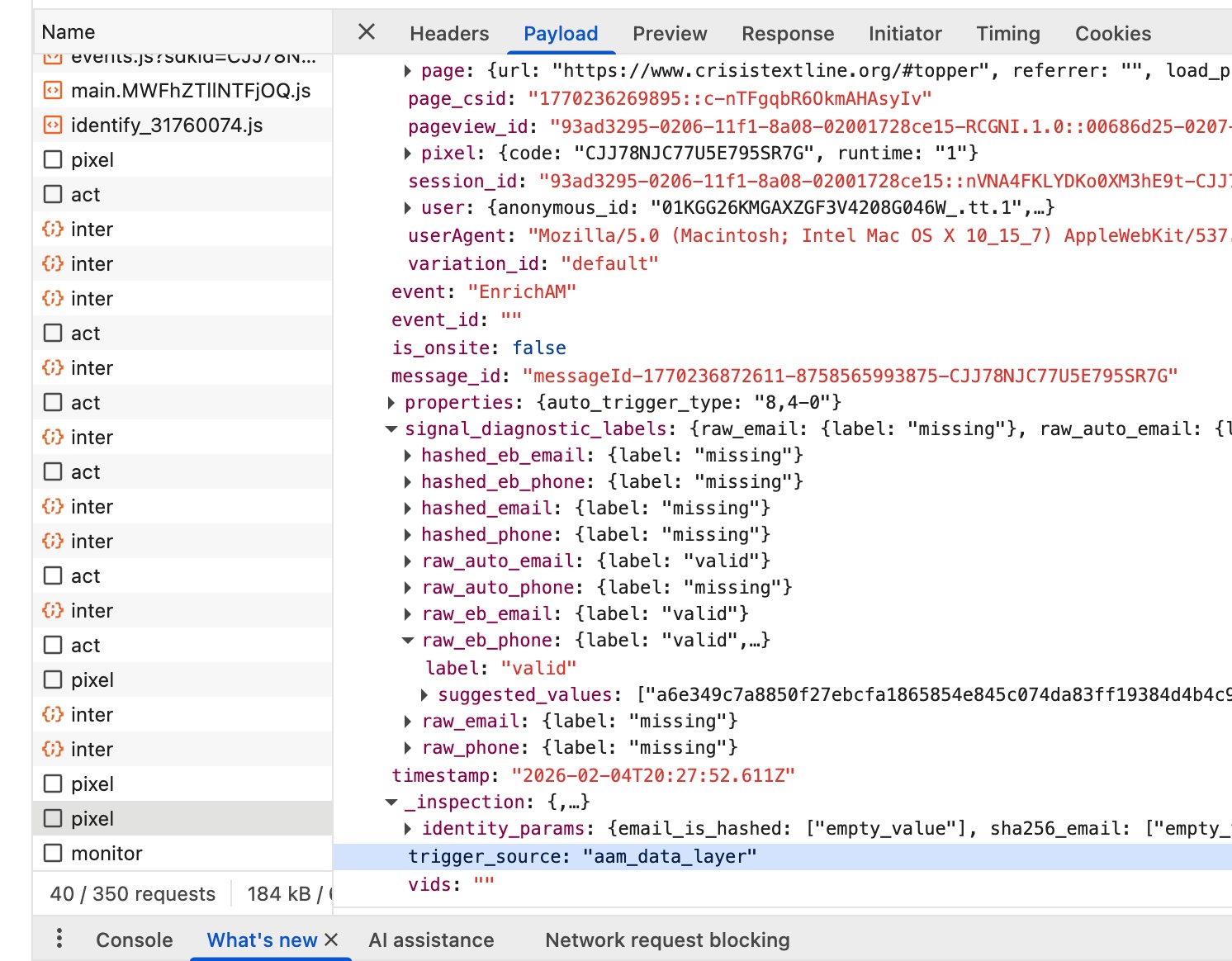
trigger_source: "aam_data_layer" confirms the email was intercepted from Google Tag Manager.Hertility Health (hertilityhealth.com)
Hertility is a UK-based women's health company, regulated by the Care Quality Commission. Their site offers hormone and fertility testing.
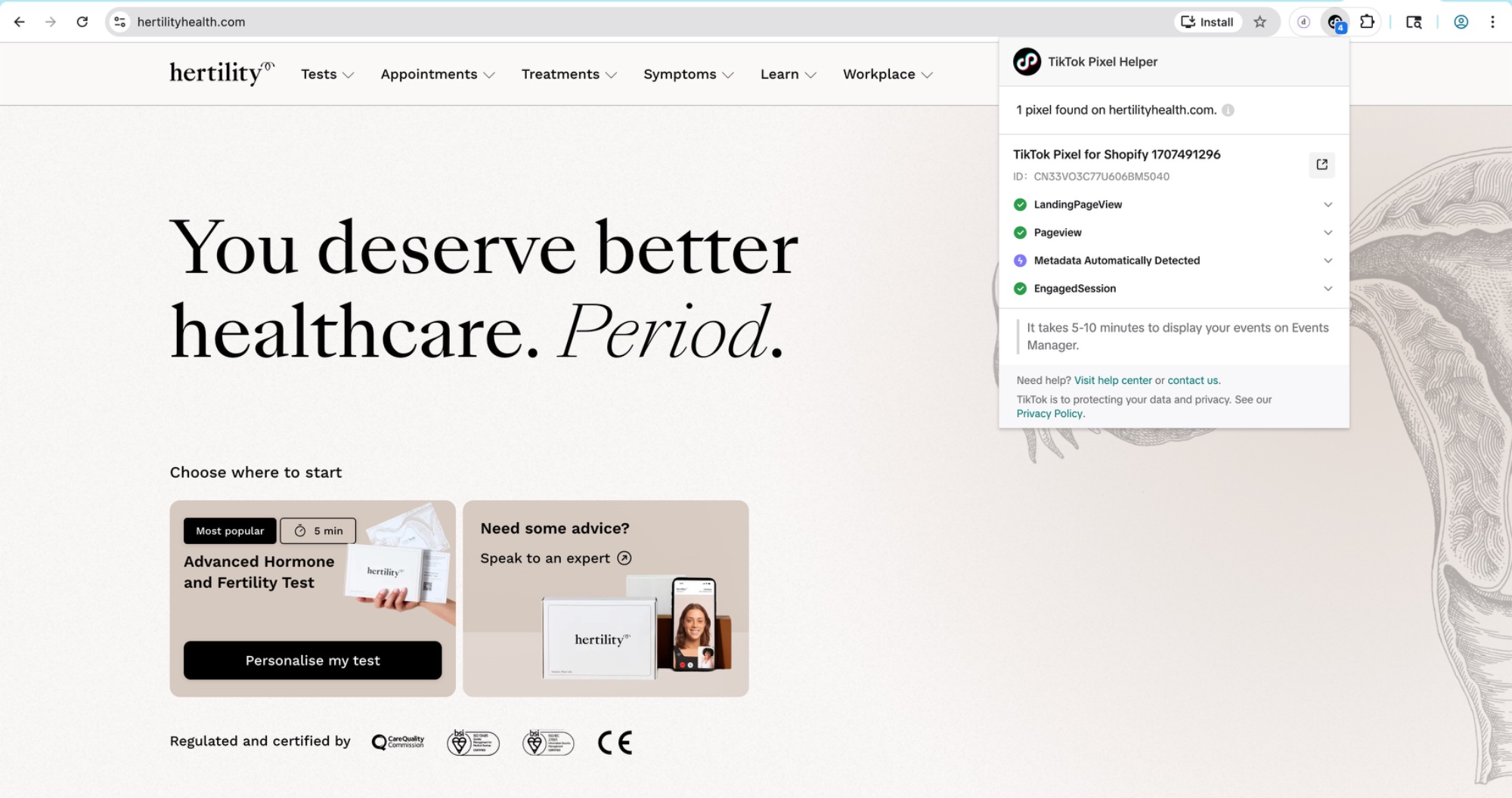
The pixel ID (CN33VO3C77U606BM5040) is labeled "TikTok Pixel for Shopify 1707491296" — deployed through TikTok's Shopify integration.
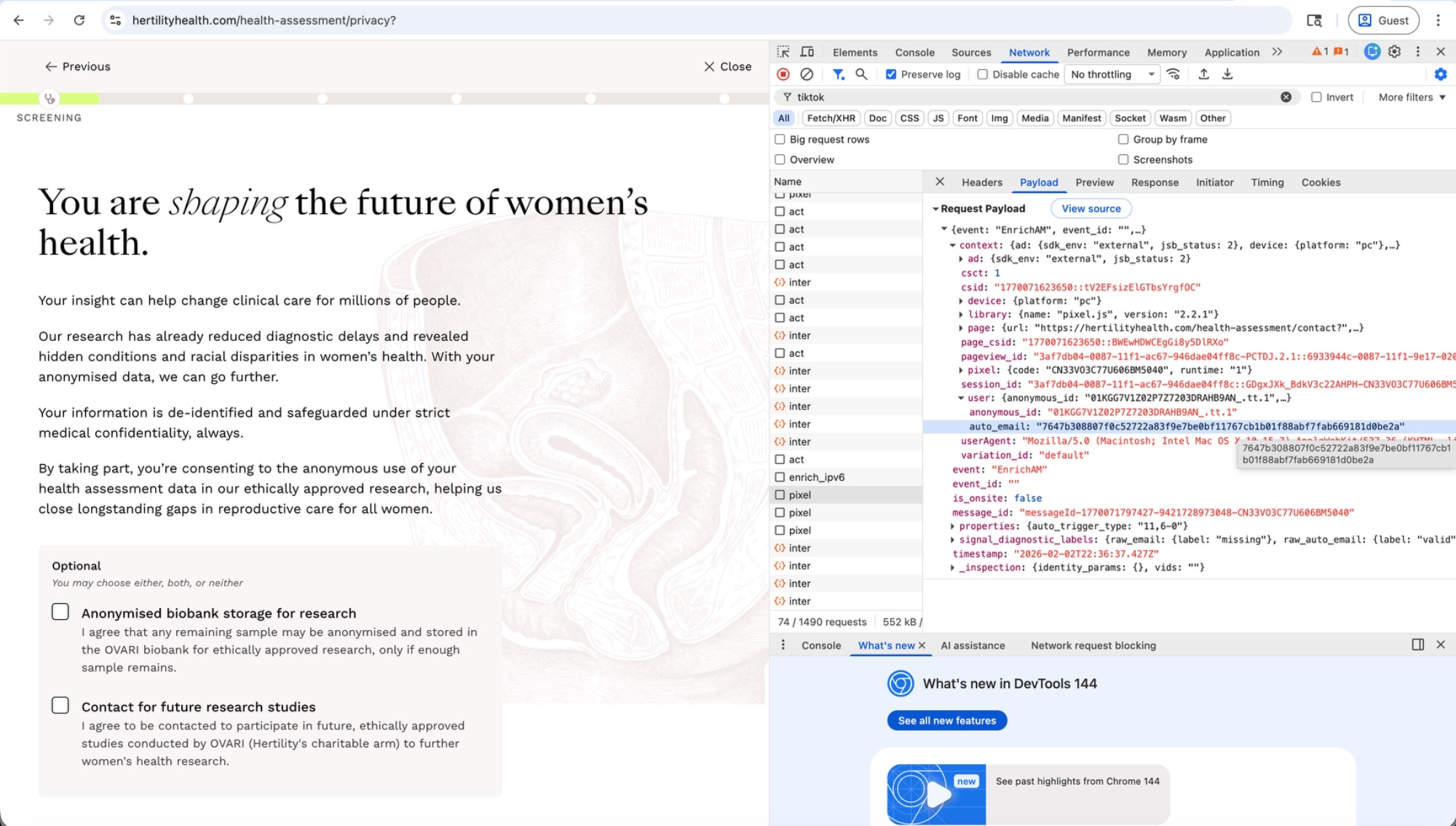
On Hertility's privacy page — which tells users "Your information is de-identified and safeguarded under strict medical confidentiality, always" — the pixel sent an EnrichAM event containing the user's hashed email.
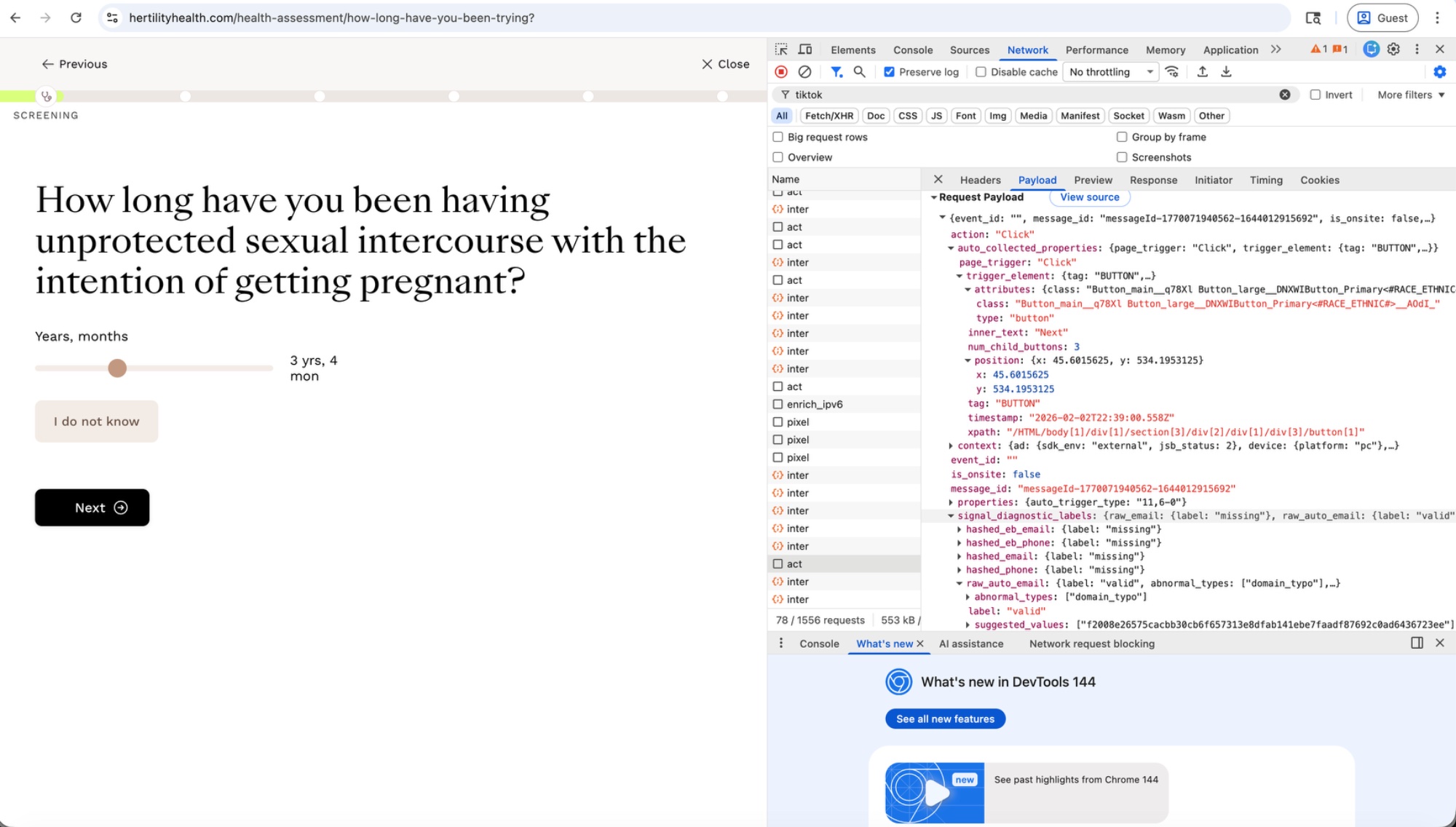
During the health assessment, clicking "Next" on a page asking "How long have you been having unprotected sexual intercourse with the intention of getting pregnant?" sent TikTok the click coordinates, button metadata, and the user's hashed email.
On the screening page asking "So, what brings you here?" — with options like "I am planning for babies in the future," "I am actively trying to conceive," and "I think I'm going through perimenopause" — each button click was captured and sent to TikTok, including the button's inner_text.
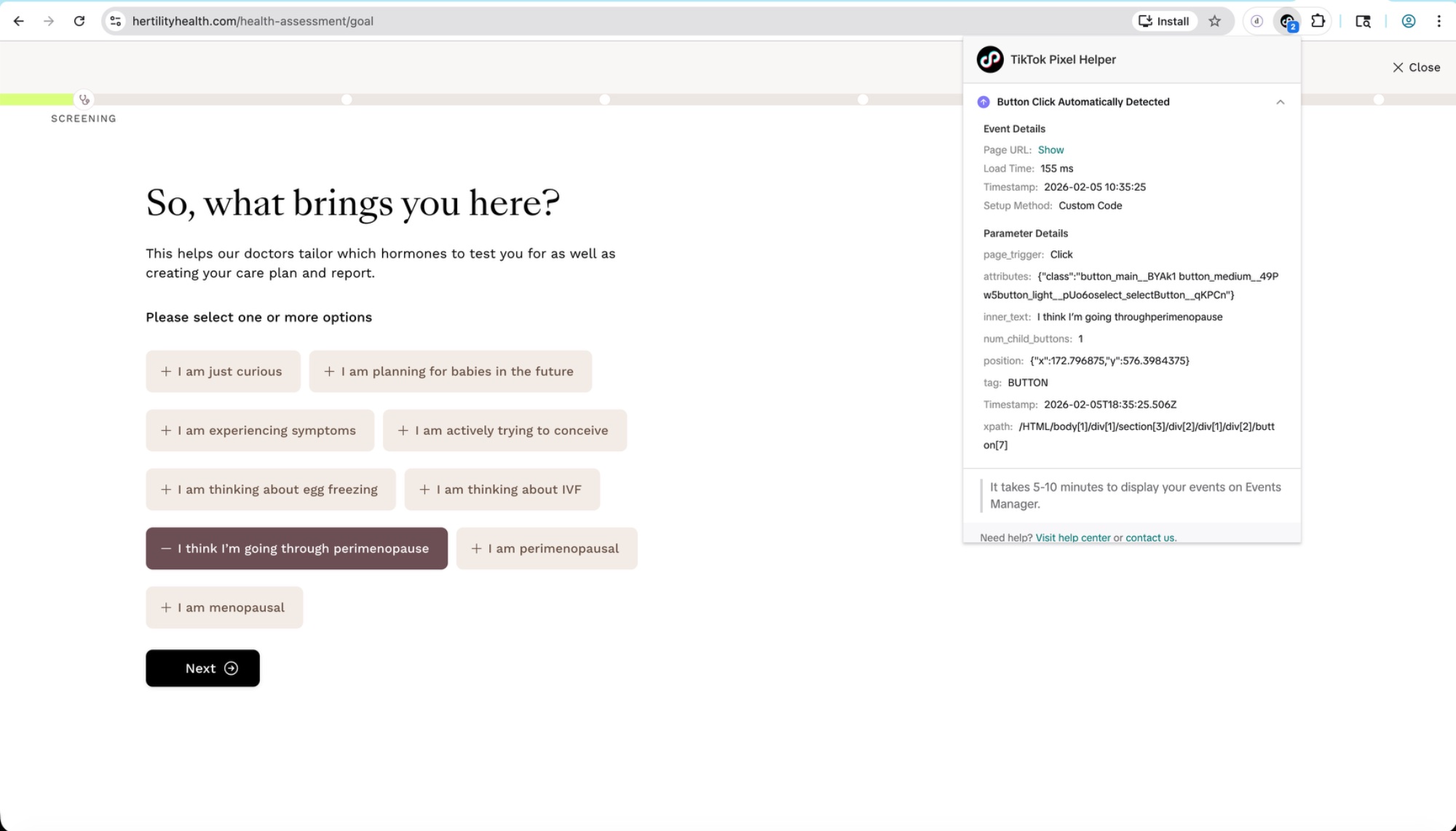
inner_text: I think I'm going through perimenopause as a captured button click.PanCAN — Pancreatic Cancer Action Network (pancan.org)
PanCAN's patient services contact page opens with: "If you or your loved one is facing pancreatic cancer, make sure PanCAN Patient Services is the first place you contact."
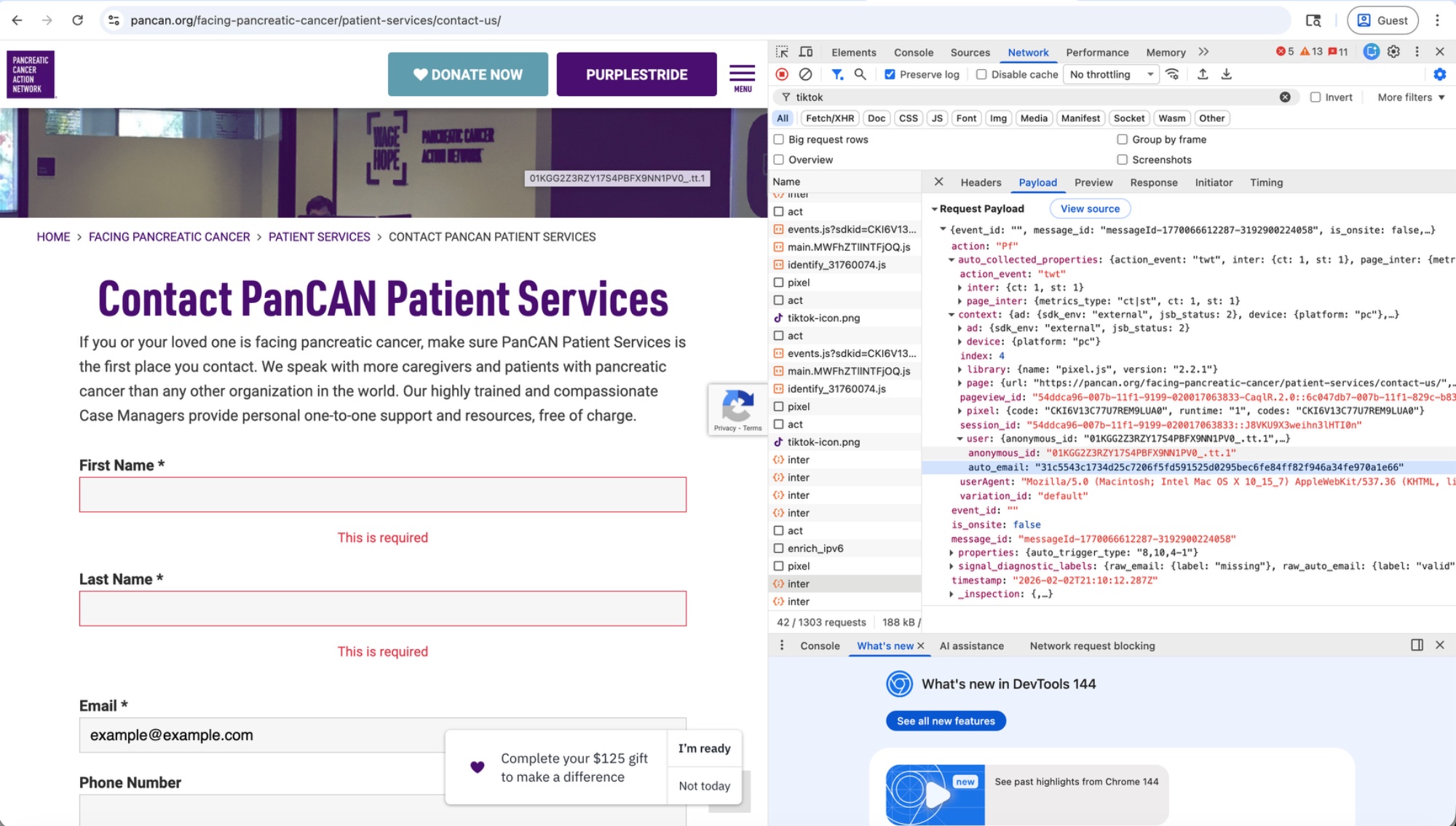
TikTok's pixel captured the user's hashed email the moment the Submit button was clicked — before the form was validated or completed.
O Positiv (opositiv.com)
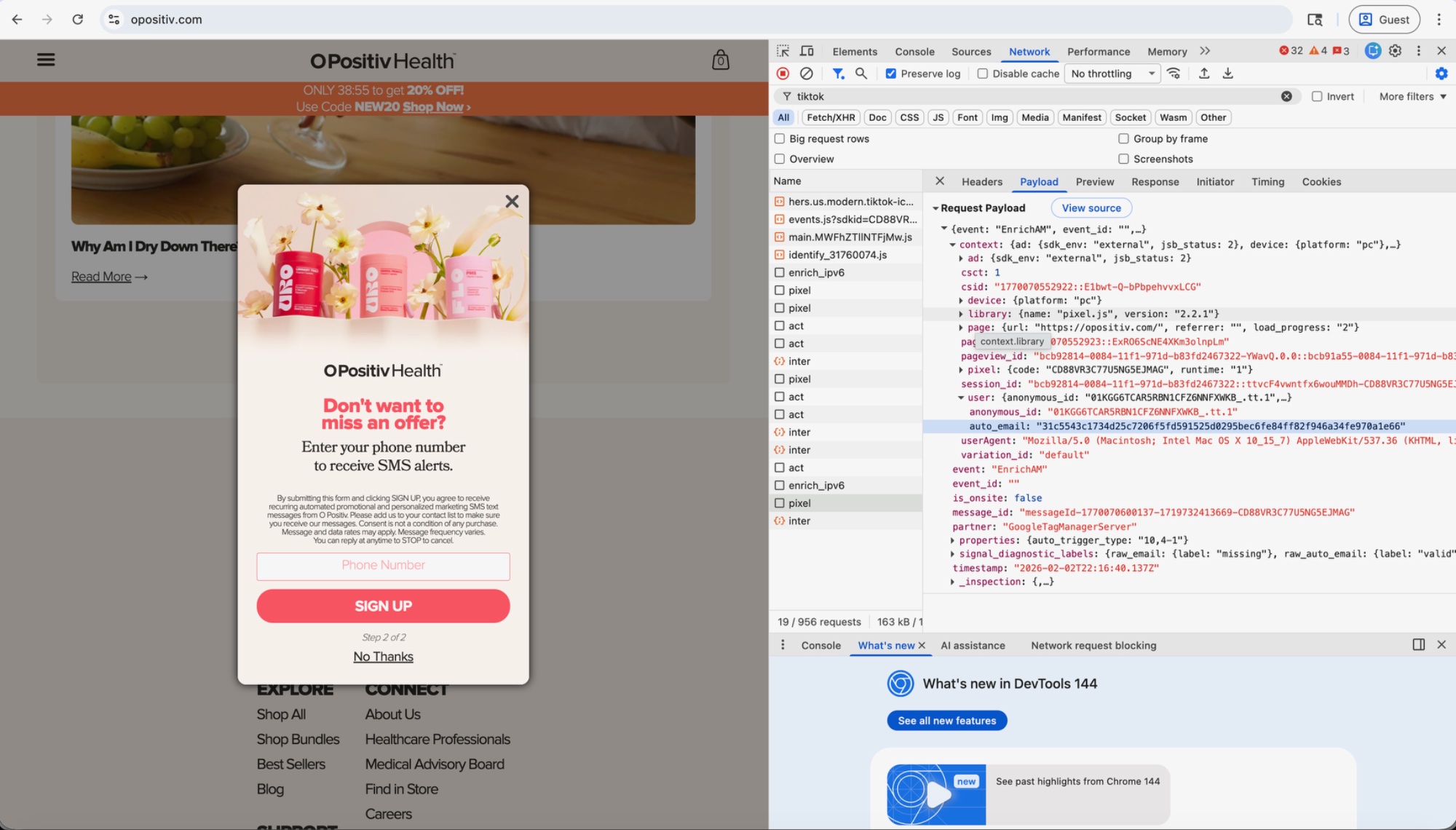
O Positiv sells women's health supplements. A popup asked the user to sign up for a 20% discount. After the user entered their email on the first screen, the popup advanced to a second screen requesting a phone number. While on this second screen, TikTok's pixel transmitted the email. The payload shows partner: "GoogleTagManagerServer".
When the user then added "URO - Vaginal Probiotic Capsules" to their cart, TikTok received the product name, price, and the user's hashed email together.
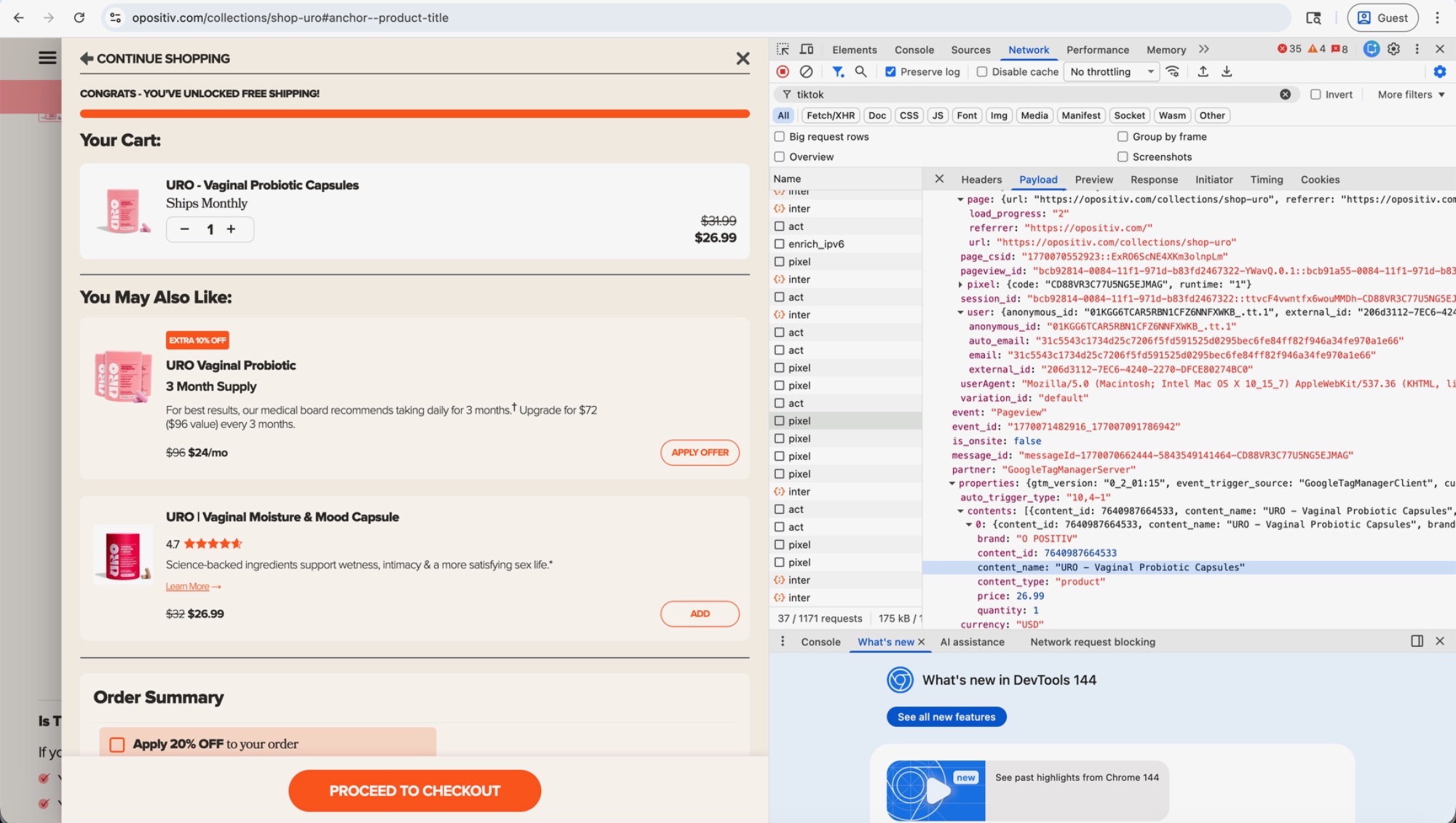
TikTok now knows: this person (identified by email hash) is purchasing vaginal health products at a specific price.
Joi & Blokes / HERMD (joiandblokes.com)
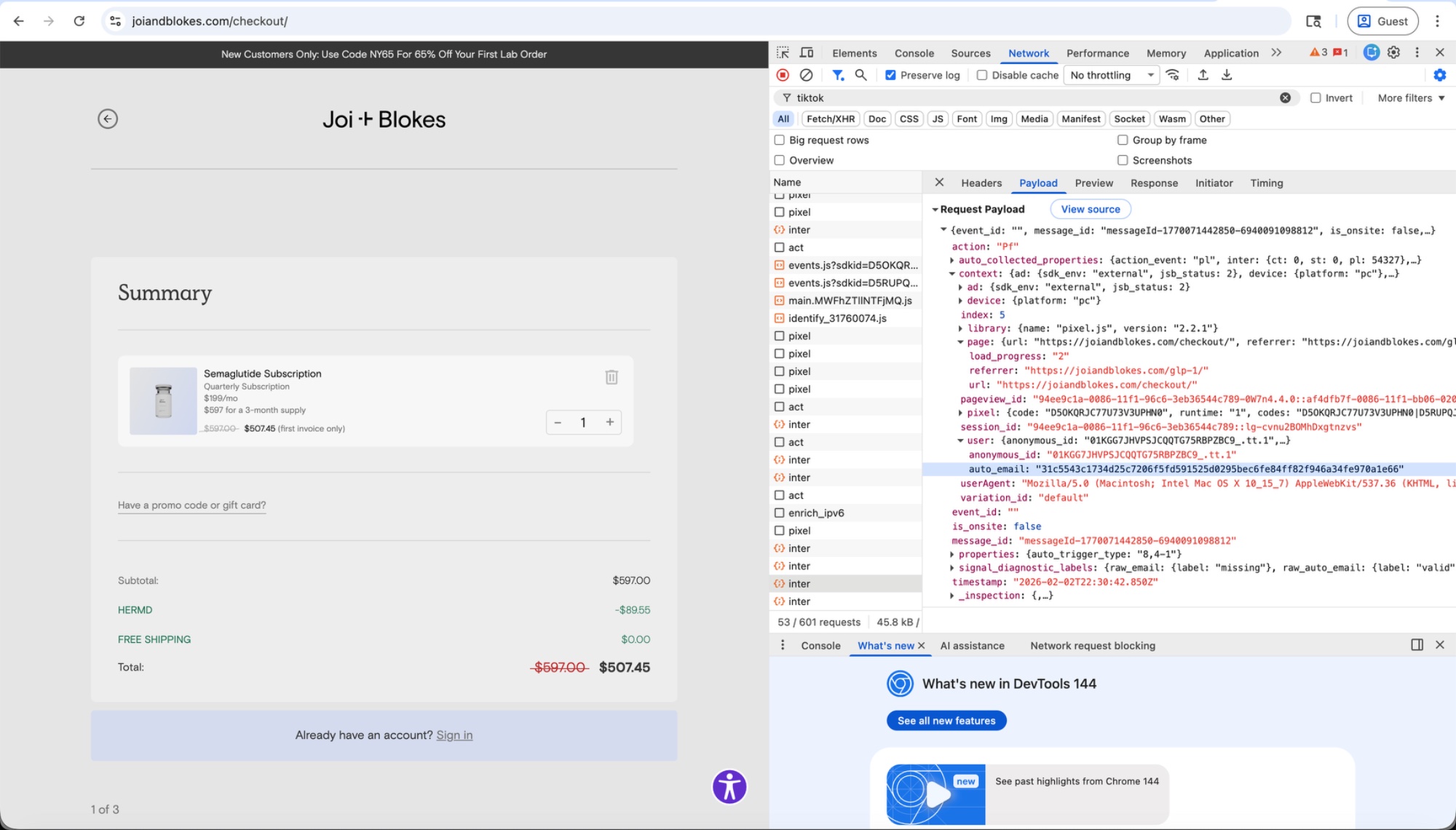
Clicking through to book a semaglutide (GLP-1) prescription lands on joiandblokes.com/checkout, where TikTok captures the user's hashed email alongside referrer: "https://joiandblokes.com/glp-1/" — revealing this person is seeking a specific prescription weight-loss medication.
How It Works: Siphoning a Copy of Data Sent to Google
The most significant new capability is a component called CDP_VISITER_PLUGIN. It hooks into Google Tag Manager's dataLayer — a JavaScript object that websites use to pass structured data to Google Tag Manager — piggybacking on events intended for Google and capturing a copy of every dataLayer.push() call in real time. When a website sends an email, phone number, or transaction to Google, TikTok's pixel silently receives the same data.
Many websites use Google Tag Manager without realizing TikTok is listening. A site owner configures GTM to send purchase data to Google Analytics, and TikTok captures that same data stream. This is how Crisis Text Line's user data was collected — through Google's infrastructure, not a form on the page.
Controlled experiment
To verify this wasn't dead code, we ran a controlled test. On crisistextline.org, we opened Chrome DevTools and pushed a synthetic purchase event — containing a test email, phone number, and transaction ID — directly into the dataLayer:
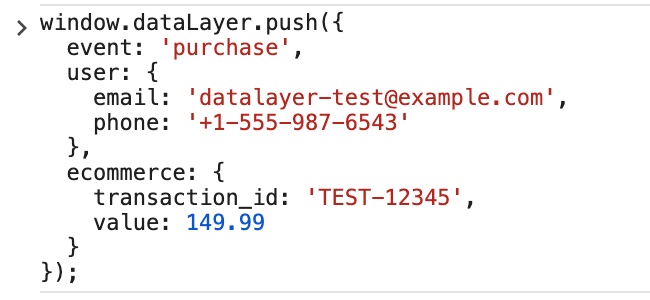
Within seconds, TikTok's /api/v2/monitor endpoint received our test transaction ID:
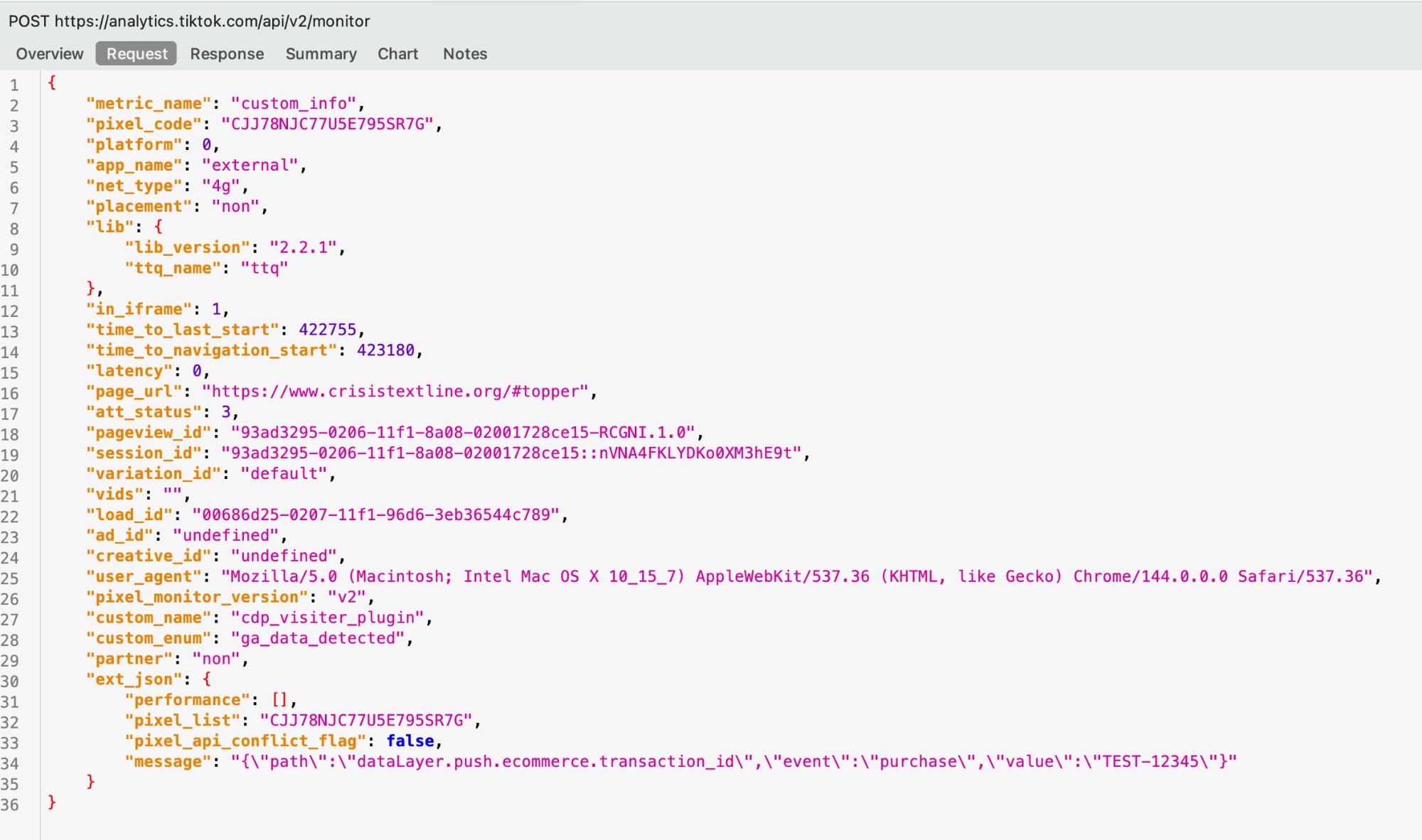
TEST-12345 via the cdp_visiter_plugin.The pixel also hashed our test email and phone number and transmitted them to analytics.tiktok.com:
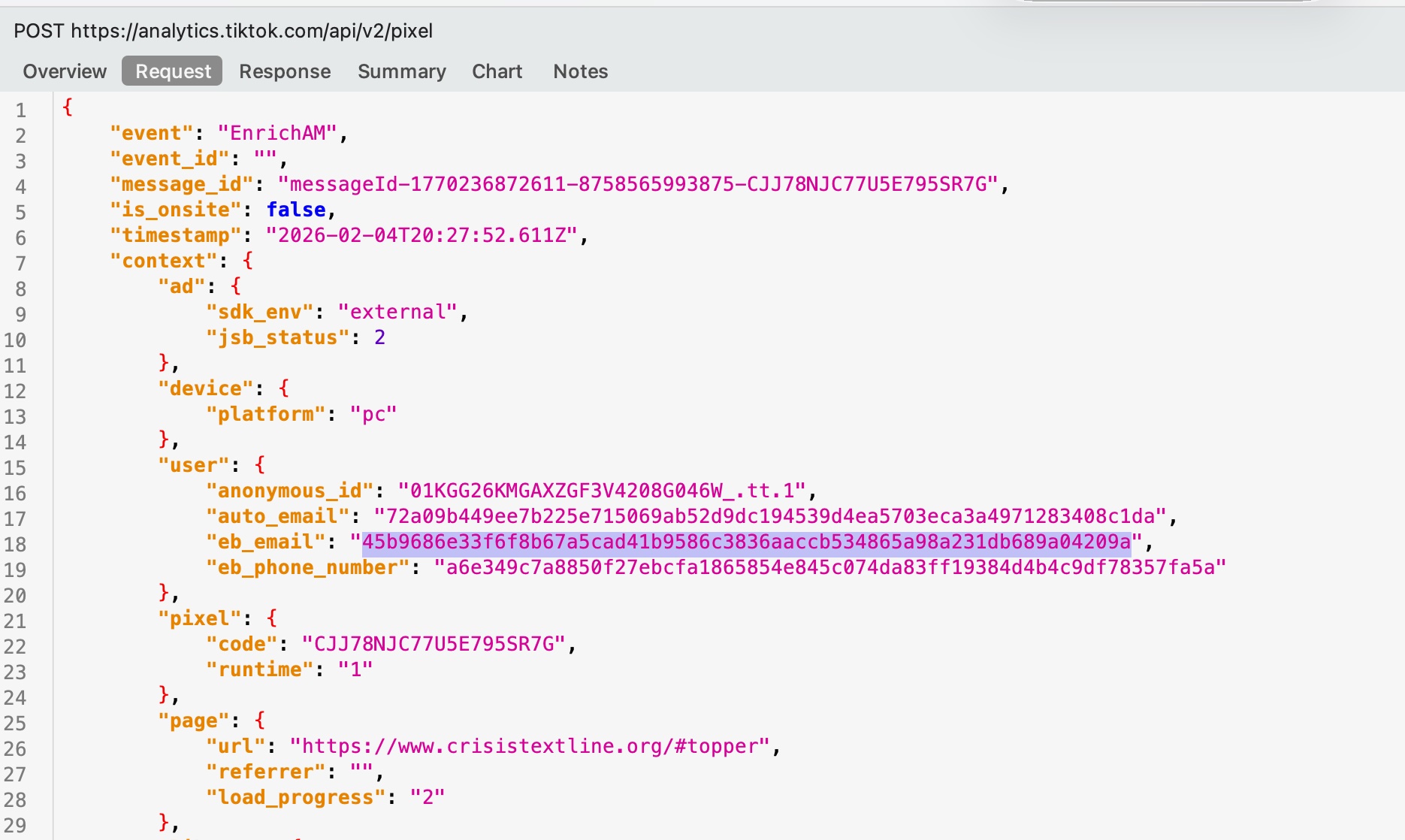
EnrichAM event sent to /api/v2/pixel with our test email and phone hashed via SHA-256.This was not a form submission. We typed nothing into the website. TikTok's pixel captured a copy of data emitted into a JavaScript object that was intended for Google.
A Note on Hashing
All of the emails and phone numbers above were SHA-256 hashed before transmission. TikTok describes this as collecting data "securely and safely with an industry-standard hashing algorithm."
This is technically accurate and practically meaningless.
TikTok has over 1 billion user accounts, each with an email and/or phone number. They can hash their entire database once, creating a lookup table that maps every hash to a user:
Website sends:  sha256("jane@gmail.com") → "a8f3d..."
TikTok lookup:  "a8f3d..." → TikTok User #482847291
Result:         "Jane saw our ad, then bought vaginal probiotics on opositiv.com"
Hashing is a deterministic identifier, not a privacy protection. It's useful for matching users across platforms, which is exactly what TikTok uses it for.
TikTok's Response
TikTok told the BBC that its users "are informed about its data practices in privacy policies and notifications." The company says websites are required to abide by privacy laws and are prohibited from sharing sensitive information like health data. TikTok also says it "takes proactive steps to alert websites that share anything inappropriate."
On the dataLayer interception, TikTok said it is "clear about what data the pixel collects" and that companies can "set up their websites differently if they don't want TikTok to see what they send Google."
TikTok's own documentation recommends that healthcare companies avoid using Auto Advanced Matching. Every health-related site in our research had it enabled.
How to Protect Yourself
All of Disconnect's products block the TikTok pixel by default. You can also use a browser that blocks trackers, like Mozilla Firefox and Microsoft Edge, which integrate Disconnect's tracking protection by default.
How to Verify This Yourself
Everything in this post is independently verifiable:
- Visit any website with TikTok's pixel (use TikTok Pixel Helper to check)
- Open Chrome DevTools → Network tab
- Filter by
tiktokoranalytics.tiktok.com - Click around the site — fill in a form, click buttons, navigate pages
- Examine the Request Payload of any
pixel,inter, oractrequest - Look for
auto_email,eb_email,trigger_source,inner_text